

Chatterblocks
Learn how to use Chatterblocks in Foldspace to create rich, interactive UI components that let users complete tasks directly within conversations
What are Chatterblocks?
Chatterblocks are custom, interactive UI components that your Foldspace agent can render directly in a conversation. Think of them as mini-apps or interactive widgets that live inside your chat, allowing you to go far beyond simple text responses.
While an AI Action is responsible for the logic (like fetching data from an API), a Chatterblock is responsible for the presentation and user interaction. They are the "Render" in an "Execute + Render" action.
Why Use Chatterblocks?
Chatterblocks transform a static chat into a dynamic, app-like experience right within the conversation.
Create Rich, App-like Experiences
Move beyond text. Display data in tables, show confirmation dialogs, or build entire forms to capture user input without leaving the chat.
Keep Users in the Flow
Allow users to complete multi-step tasks—like editing a project or updating their profile—directly in the conversation, dramatically reducing friction.
Full Creative Control
You have full control over the look and feel. Use standard HTML, CSS, and JavaScript to build any UI you need, perfectly matching your brand.
How They Work: Action ➡️ Chatterblock
A Chatterblock is always triggered by an Execute + Render AI Action. The process is a simple, two-step flow:
- The
executefunction in your AI Action fetches the necessary data. - The
renderfunction takes that data and uses it to build and display the Chatterblock UI.
Example
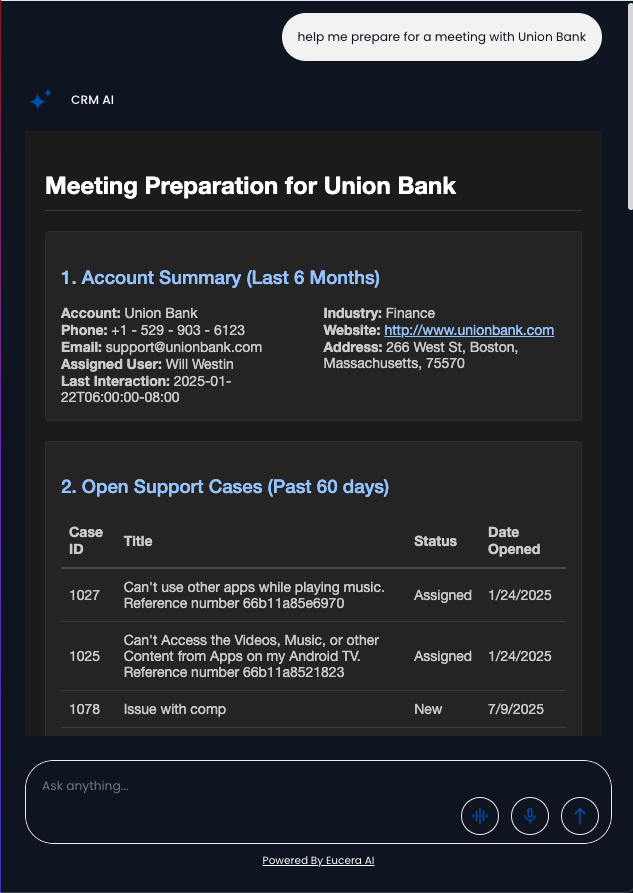
Next Steps
Ready to build your first interactive component?
Updated 9 months ago